
■ Sound familiar
Why facility maintenance falls behind
Most facility teams are not short on effort. They are short on one system that holds the buildings, the equipment, and the costs.
NovoGov Facilities Maintenance Software
NovoGov Facilities Maintenance Software is a cloud-based system that local government facility managers use to track buildings and equipment, schedule maintenance that creates its own work orders, log utility meters, and report costs by department or by building, from one online dashboard. Some governments call this facility management software or municipal facilities software; the job is the same either way.
Employees submit work requests from a desktop or phone instead of calling, and crews view and update assets and work orders from a smartphone or tablet in the field. It connects to the work order and asset management tools your other departments already use.
■ See it running
Watch the demo
(Demo video for Facility Maintenance with NovoGov, On the ShareNet Platform)
■ Asset tracking
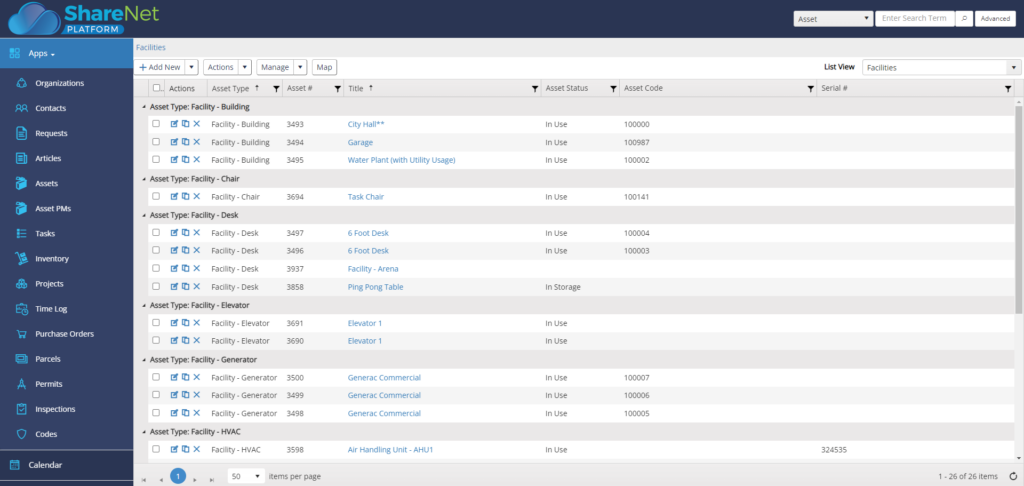
Buildings, HVAC, and equipment in one list
Track any kind of asset: buildings, HVAC units, and the equipment inside them, with asset and work order forms you can customize. Barcode tags placed on equipment or door frames mean a technician scans an asset and has its full maintenance history on screen before the panel is open.

■ Maintenance and requests
Maintenance and requests that route themselves
Define scheduled maintenance at any time interval and NovoGov generates and assigns the work orders on its own. Employees submit work requests from a desktop or phone, which cuts the calls and emails the facilities team has to field. For outsourced work, preferred contractors and their information stay on file, so jobs get scheduled faster, and crews update everything from a smartphone or tablet with suppliers a tap away.
■ Meters, parts, and costs
What each building costs to run
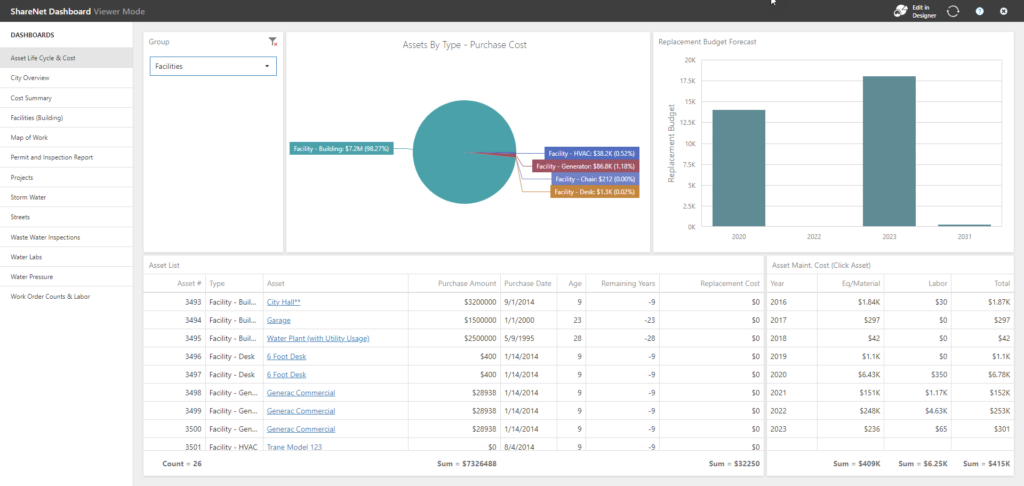
Log utility meter readings and let reports and dashboards calculate energy costs per building. Stocked and non-stocked parts are tracked against work orders, with a weekly re-order report so the storeroom stays ahead of the next repair. Labor, equipment, and parts costs roll up by department or by building, which is how maintenance budgets get allocated on evidence instead of memory.
■ What switching looks like
Going live without a maintenance gap
The buildings keep running the whole time. Nothing gets turned off until the new system is running.
What our clients say
Steven Pilcher, Director of Public Service

“The NovoGov Municipal Software has really helped streamline processes, reduce costs, provide better metrics, and run a more efficient public service department, which in turns creates a better relationship between department staff and the customers served.”

Thomas Wilbur, Highway Superintendent
“With NovoGov, it’s easy to collect and view the data in a way that actually makes sense. What used to take 45 minutes now takes less than 2—and it’s accurate, searchable, and right at our fingertips. The only thing limiting us now is time and imagination.”
Thomas Wilbur, Highway Superintendent, Keith County, Nebraska

Travis Sirrine, Highway Superintendent
“The Board of Selectmen was blown away the first time I showed them what we could now report on. They had no idea how many tasks we handled. Now they have data—charts, work orders, asset histories. It changed the conversation.”
Travis Sirrine, Highway Superintendent

David Seugling, Public Works Director
“Switching to NovoGov has been a game changer for our department. It’s streamlined communication, eliminated paperwork, and made it easy for our field crews to update work orders in real time. The system is incredibly flexible and user-friendly — I’d make the switch to NovoGov again in a heartbeat.”
David Seugling – Public Works Director

Todd Philbrook, Public Works Director
“NovoGov works REALLY well for us. It’s easy to enter data, easy to look up complaints, and flexible enough that it can be tailored to match exactly how we operate. The support has been phenomenal, and it’s saving us time across the board.”
Todd Philbrook, Public Works Director

■ Taking it to the board
What this looks like in a council packet
■ Built for government
What your procurement team will ask
■ Questions we get
Facilities Maintenance Software FAQ
■ Next step
Request a demo
A working session on your own buildings, not a slide deck. We will show you how an asset is tracked, how an employee work request becomes a work order, and what the cost report by building looks like at the end of the quarter.