
■ Sound familiar
Why sign compliance is so hard to prove
Keeping street and traffic signs visible, compliant, and well-maintained is essential to public safety. Tracking them manually is what makes it difficult to stay organized.
NovoGov Sign Management Software
NovoGov Sign Management Software is a system municipalities use to map every street and traffic sign, record its condition, install date, and last maintenance, inspect it on a schedule or by condition, and generate the work orders that replace it. Some governments call this street sign software or traffic sign management software; the job is the same either way.
It is part of our Public Works Operations Management system, so signs sit alongside the roads they stand on and the crews who maintain them. Whether you manage hundreds or thousands of signs, it is the same record your other departments already work in.
■ See it running
Watch the demo
A demo of managing signs in NovoGov on the ShareNet Platform: mapping a sign, recording its condition, and turning an inspection into a replacement work order.
■ Sign inventory
Every sign, and the parts to replace it
Signs fade, get damaged, or disappear after storms, and a sign inventory management system has to keep up with all three. Maintain a live inventory of spare signs, posts, and materials, deduct parts automatically when a work order is created, and link replacements directly to each sign record. When a replacement is completed, staff update the sign’s attributes on the map, so the inventory and the asset records stay accurate.


■ Conditions and compliance
MUTCD compliance you can actually prove
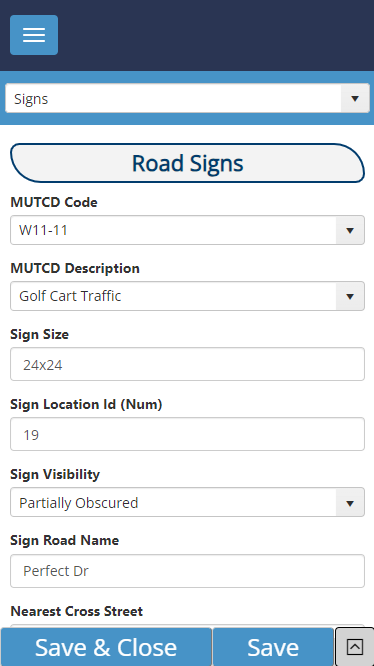
Each sign is mapped with details like condition, install date, and last maintenance date, giving supervisors instant insight into asset health. Record and monitor reflectivity compliance with MUTCD standards, track inspections and replacements based on condition or schedule, and generate reports to ensure federal and local compliance. Whether you use a retroreflectometer or follow a rotation schedule, the documentation comes out of the same system.
■ Work orders and the field
Assign it, track it, close it from the truck
Assign and track sign-related work orders from one dashboard: schedule replacements and inspections, monitor in-progress and completed jobs in real time, and update sign condition data directly from the field using mobile access. That is what reduces the paperwork, prevents the missed inspection, and keeps the streets safer.
■ What switching looks like
Going live without losing a sign
Crews keep working the whole time. Nothing gets turned off until the new system is running.
What our clients say
Thomas Wilbur, Highway Superintendent

“With NovoGov, it’s easy to collect and view the data in a way that actually makes sense. What used to take 45 minutes now takes less than 2—and it’s accurate, searchable, and right at our fingertips. The only thing limiting us now is time and imagination.”
Thomas Wilbur, Highway Superintendent, Keith County, Nebraska

Travis Sirrine, Highway Superintendent
“The Board of Selectmen was blown away the first time I showed them what we could now report on. They had no idea how many tasks we handled. Now they have data—charts, work orders, asset histories. It changed the conversation.”
Travis Sirrine, Highway Superintendent

David Seugling, Public Works Director
“Switching to NovoGov has been a game changer for our department. It’s streamlined communication, eliminated paperwork, and made it easy for our field crews to update work orders in real time. The system is incredibly flexible and user-friendly — I’d make the switch to NovoGov again in a heartbeat.”
David Seugling – Public Works Director

Todd Philbrook, Public Works Director
“NovoGov works REALLY well for us. It’s easy to enter data, easy to look up complaints, and flexible enough that it can be tailored to match exactly how we operate. The support has been phenomenal, and it’s saving us time across the board.”
Todd Philbrook, Public Works Director

■ Taking it to the board
What this looks like in a council packet
■ Built for government
What your procurement team will ask
■ Questions we get
Sign Management Software FAQ
■ Next step
Request a demo
A working session on your own sign inventory, not a slide deck. We will show you a sign on the map with its condition and install date, how an inspection becomes a replacement work order, and what the compliance report looks like when somebody asks for it.